
SwiftUI vs React Native: Binding vs Props
Following on from my previous article comparing SwiftUI and React Native, I want to look at another interesting difference between the two frameworks.
In the first article, SwiftUI vs React Native: State, we looked at how @State and useState manage local state.
But what happens when a parent view needs to share that state with a child view, and the child needs to be able to modify it?
This is where SwiftUI introduces another useful property wrapper: @Binding.
React Native takes a slightly different approach, using props and callback functions.
Let’s take a look.
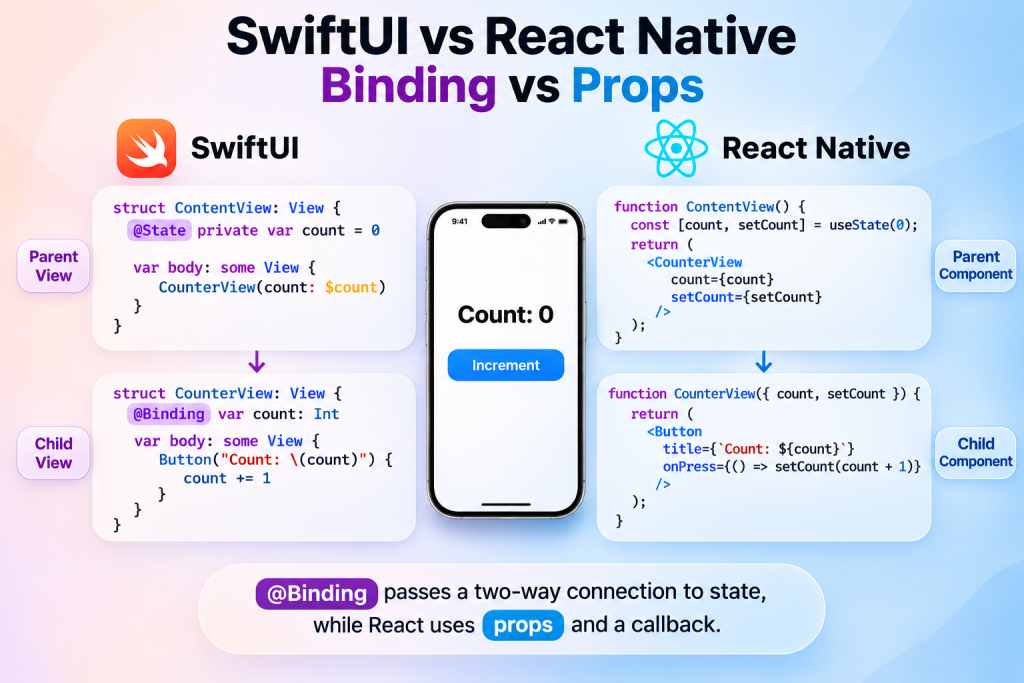
SwiftUI: @Binding
In SwiftUI, @State establishes ownership of a piece of state, while @Binding allows another view to access and modify that state without owning it.
For example, imagine we have a simple counter:
struct ContentView: View {
    @State private var count = 0

    var body: some View {
        CounterView(count: $count)
    }
}
Notice the $ before count. This passes a binding to the state rather than simply passing its value.
Our child view can then receive and modify that state:
struct CounterView: View {
    @Binding var count: Int

    var body: some View {
        Button("Count: \(count)") {
            count += 1
        }
    }
}
The child doesn’t own the state. It simply has a two-way connection to the state owned by its parent.
When the child modifies count, the parent sees the change, and SwiftUI updates the relevant views.
Pretty straightforward!
React Native: Props and callbacks
React Native doesn’t have a direct equivalent of @Binding.
Instead, we typically pass the state value and a function to update it as props.
Here’s the same counter:
function ContentView() {
  const [count, setCount] = useState(0);

  return (
    <CounterView
      count={count}
      setCount={setCount}
    />
  );
}
Our child component receives both:
function CounterView({ count, setCount }) {
  return (
    <Button
      title={`Count: ${count}`}
      onPress={() => setCount(count + 1)}
    />
  );
}
The parent owns the state, while the child receives the current value and a function that allows it to request an update.
Notice that React props themselves are read-only. The child isn’t directly modifying the parent’s state; it’s calling a function provided by the parent.
The end result is very similar to SwiftUI, but the mechanism is different.
So, what’s the difference?
The key distinction is how the two frameworks represent this relationship.
SwiftUI’s @Binding packages the ability to read and write a value into a single property.
React typically separates these responsibilities:
- The value is passed down as a prop.
- A callback function is passed down to communicate changes back up.
Here’s a quick comparison:
| SwiftUI | React Native |
|---|---|
@State | useState |
$count | count and setCount |
@Binding var count | count and setCount props |
| Modify binding | Call setter function |
Neither approach is inherently better. Both allow a child view or component to work with state owned by its parent.
One thing worth remembering is that this works well for relatively simple view hierarchies. As applications grow, passing values and callbacks through multiple layers can become cumbersome.
In React, this is commonly known as prop drilling. The same problem exists in SwiftUI, although the terminology is less commonly used.
And that’s where things get interesting.
Both frameworks have mechanisms for making data available further down the view hierarchy without having to pass it through every intermediate view or component.
We’ll explore those in the next article: Environment vs Context.
More to come!
Leave a Reply