AS3 in Swift? Whaa?

This week I thought it could be an interesting exercise to write the AS3 SDK from within Swift, using SpriteKit. So I did! Remember DisplayObjects? MovieClips? EventDispatchers? gotoAndPlay? They’re back!

Some might call it crazy, some might call it heresy, some might say I just have too much time on my hands, but here I present what I’ve dubbed… ActionSwift 3!

https://github.com/craiggrummitt/ActionSwift3

ActionSwift icon

Tagged with:
Posted in Flash, Swift

Multi line SKLabels in Swift

Updated for Swift 3!

Sometimes Apple seems to have made some pretty obvious oversights – a SKLabel without multi-line capability? Strange.

I’ve had a look at some third party solutions and each seemed to have their own limitations. Here is my take on a multiline SKLabel in Swift (doesn’t account for \n but does account for word wrapping)


//
// SKMultilineLabel.swift
//
// Created by Craig on 10/04/2015.
// Copyright (c) 2015 Interactive Coconut.
// MIT License, http://www.opensource.org/licenses/mit-license.php
//
/* USE:
(most component parameters have defaults)
let multiLabel = SKMultilineLabel(text: "Lorem ipsum dolor sit amet, consectetur adipiscing elit, sed do eiusmod tempor incididunt ut labore et dolore magna aliqua. Ut enim ad minim veniam, quis nostrud exercitation ullamco laboris nisi ut aliquip ex ea commodo consequat. Duis aute irure dolor in reprehenderit in voluptate velit esse cillum dolore eu fugiat nulla pariatur. Excepteur sint occaecat cupidatat non proident, sunt in culpa qui officia deserunt mollit anim id est laborum.", labelWidth: 250, pos: CGPoint(x: size.width / 2, y: size.height / 2))
self.addChild(multiLabel)
*/
import SpriteKit
class SKMultilineLabel: SKNode {
//props
var labelWidth:Int {didSet {update()}}
var labelHeight:Int = 0
var text:String {didSet {update()}}
var fontName:String {didSet {update()}}
var fontSize:CGFloat {didSet {update()}}
var pos:CGPoint {didSet {update()}}
var fontColor:UIColor {didSet {update()}}
var leading:Int {didSet {update()}}
var alignment:SKLabelHorizontalAlignmentMode {didSet {update()}}
var dontUpdate = false
var shouldShowBorder:Bool = false {didSet {update()}}
//display objects
var rect:SKShapeNode?
var labels:[SKLabelNode] = []
init(text:String, labelWidth:Int, pos:CGPoint, fontName:String="ChalkboardSE-Regular",fontSize:CGFloat=10,fontColor:UIColor=UIColor.white,leading:Int? = nil, alignment:SKLabelHorizontalAlignmentMode = .center, shouldShowBorder:Bool = false)
{
self.text = text
self.labelWidth = labelWidth
self.pos = pos
self.fontName = fontName
self.fontSize = fontSize
self.fontColor = fontColor
self.leading = leading ?? Int(fontSize)
self.shouldShowBorder = shouldShowBorder
self.alignment = alignment
super.init()
self.update()
}
required init?(coder aDecoder: NSCoder) {
fatalError("init(coder:) has not been implemented")
}
//if you want to change properties without updating the text field,
// set dontUpdate to false and call the update method manually.
func update() {
if (dontUpdate) {return}
if (labels.count>0) {
for label in labels {
label.removeFromParent()
}
labels = []
}
let separators = NSCharacterSet.whitespacesAndNewlines
let words = (text as NSString).components(separatedBy: separators)
var finalLine = false
var wordCount = 1
var lineCount = 0
while (!finalLine) {
lineCount+=1
var lineLength = CGFloat(0)
var lineString = ""
var lineStringBeforeAddingWord = ""
// creation of the SKLabelNode itself
let label = SKLabelNode(fontNamed: fontName)
// name each label node so you can animate it if u wish
label.name = "line\(lineCount)"
label.horizontalAlignmentMode = alignment
label.fontSize = fontSize
label.fontColor = fontColor
while lineLength < CGFloat(labelWidth)
{
wordCount+=1
if wordCount > words.count1
{
//label.text = "\(lineString) \(words[wordCount])"
finalLine = true
break
}
else
{
lineStringBeforeAddingWord = lineString
lineString = "\(lineString) \(words[wordCount])"
label.text = lineString
lineLength = label.frame.width
}
}
if lineLength > 0 {
wordCount-=1
if (!finalLine) {
lineString = lineStringBeforeAddingWord
}
label.text = lineString
var linePos = pos
if (alignment == .left) {
linePos.x -= CGFloat(labelWidth / 2)
} else if (alignment == .right) {
linePos.x += CGFloat(labelWidth / 2)
}
linePos.y += CGFloat(leading * lineCount)
label.position = CGPoint(x:linePos.x , y:linePos.y )
self.addChild(label)
labels.append(label)
}
}
labelHeight = lineCount * leading
showBorder()
}
func showBorder() {
if (!shouldShowBorder) {return}
if let rect = self.rect {
self.removeChildren(in: [rect])
}
self.rect = SKShapeNode(rectOf: CGSize(width: labelWidth, height: labelHeight))
if let rect = self.rect {
rect.strokeColor = UIColor.white
rect.lineWidth = 1
rect.position = CGPoint(x: pos.x, y: pos.y (CGFloat(labelHeight) / 2.0))
self.addChild(rect)
}
}
}

Tagged with:
Posted in Swift

SKTexture gradient

SpriteKit at times can seem a little rudimentary – small tasks can seem to take longer than they should! Today I ran into a limitation of SKShapeNodes – there doesn’t seem to be a default way to set up a gradient fill. I have created an extension to SKTexture to generate a gradient – you can then use this SKTexture in a SKShapeNode (fillTexture) or a SKSpriteNode.

Credit to an Objective C class developed by Joseph Preiss that I found here and heavily based my Swift version on. I made it an extension of SKTexture and added gradient direction.

enum GradientDirection {
    case up
    case left
    case upLeft
    case upRight
}
extension SKTexture {
    convenience init(size:CGSize,color1:CIColor,color2:CIColor,direction:GradientDirection = .up) {
        let coreImageContext = CIContext(options: nil)
        let gradientFilter = CIFilter(name: &quot;CILinearGradient&quot;)
        gradientFilter.setDefaults()
        var startVector:CIVector
        var endVector:CIVector
        switch direction {
        case .up:
            startVector = CIVector(x: size.width/2, y: 0)
            endVector = CIVector(x: size.width/2, y: size.height)
        case .left:
            startVector = CIVector(x: size.width, y: size.height/2)
            endVector = CIVector(x: 0, y: size.height/2)
        case .upLeft:
            startVector = CIVector(x: size.width, y: 0)
            endVector = CIVector(x: 0, y: size.height)
        case .upRight:
            startVector = CIVector(x: 0, y: 0)
            endVector = CIVector(x: size.width, y: size.height)
            
        }
        gradientFilter.setValue(startVector, forKey: &quot;inputPoint0&quot;)
        gradientFilter.setValue(endVector, forKey: &quot;inputPoint1&quot;)
        gradientFilter.setValue(color1, forKey: &quot;inputColor0&quot;)
        gradientFilter.setValue(color2, forKey: &quot;inputColor1&quot;)
        let cgimg = coreImageContext.createCGImage(gradientFilter.outputImage, fromRect: CGRect(x: 0, y: 0, width: size.width, height: size.height))
        self.init(CGImage:cgimg)
    }
}
Tagged with: ,
Posted in Swift

Localization playing nicely with string interpolation in Swift

I can’t work out why Apple’s documentation of Swift core data types is still so poor, but luckily we have Swiftdoc. To illustrate, according to Apple docs there are two init methods for String. If you want to know the true state of affairs, look at swiftdoc, where there are about 40 varieties. Sure, a lot of them are bridged from Foundation’s NSString, but they’re still worth having info on. Or are they redundant now?

For example:

init(format: String, locale: NSLocale?, arguments: [CVarArgType])

To jog the memory banks, this may be more familiar in Objective C:

NSString *name = "Craig";
NSString *msg = [NSString stringWithFormat:@"Hello %@",name];

That old chestnut! Inserting a variable value into a string – otherwise known as string interpolation. But what do we want with that in Swift? We already have a neat much more readable new syntax for that:

let name = "Craig"
let msg = "Hello \(name)"

Well, that seems to be that. No need for the old-school Objective C interpolation if we’re programming in Swift right?

wrong…

%@ raises its ugly head in localization!

In your localization.strings files the only way of including string interpolation is still the old Objective C style. And it makes sense too, the new Swift approach includes the variable name itself in the string – that wouldn’t be possible in the localization files.

If you’re not familiar with localization there’s a great tutorial here.

So if your localization.strings file included:

"Hello %@" = "Hello %@";

The old Objective C way of accessing it was:

NSString *name = "Craig";
NSString *msg = [NSString stringWithFormat:NSLocalizedString(@"Hello %@", nil),name];

The Swift version looks like:

let name = "Craig"
let msg = String(format: NSLocalizedString("Hello %@", comment: ""), name)

Tagged with: ,
Posted in Objective C, Swift

Looking back on 2014

2014 has been a great year, where I have made the transition from Flash to native iOS development and set up Interactive Coconut. Finished the year heavily involved in writing the Swift course for Thinkful, with interactive coconut in full swing, three apps on the App Store and two in Google Play. Subtitles Viewer has had 4000+ downloads on the App Store alone, and it has been encouraging receiving kind emails of gratitude for the app from the hearing impaired community.

Here are my most popular posts of 2014:

Swift/Objective C:

Communication between objects in Objective C and Swift compared with ActionScript:
Part 1: Callbacks
Part 2: Actions
Part 3: Delegates
Part 4: Blocks/Closures
Part 5: Events

Parameter defaults and Optional function parameters in Swift

Easing equations in Swift

How to create a concave SKPhysicsBody

Optional parameters in methods in Objective C
func parameters in Swift

Popups, Popovers, Pushing, Popping, Presenting, Alerts and Actionsheets!

Flash/Actionscript

Comparing Facebook/Social ANEs (Tweeted by Adobe Flash Platform)

7 common GOTCHAs for when you’re starting out with Flash Actionscript

Posted in Flash, Objective C, Swift

7 common GOTCHAs for when you’re starting out with Flash Actionscript

I was thinking the other day about the process of learning Swift and how a list of common gotchas would have been handy when starting out. Since I have about 15 years of experience in ActionScript I thought it might be handy to write a list for common gotchas for anyone starting out learning AS3.

1. You compile your movie and you see ‘ReferenceError: Error #1065: Variable TCMText is not defined.’ in your Output panel.

Don’t worry about this confusing error, it’s just that the Output Panel has priority over the Compiler Errors panel (as its the last thing that happened) – open the Compiler Errors panel, and resolve these errors and you’ll find that you’ve also resolved the obscure error that appeared in the Output panel!
(This you won’t see in CC as CC doesn’t have TLF text, but is relevant if you’re still using CS6 or less and your FLA contains TLF text)

2.You see an error in the Output panel, but you have no idea on what line the error occurred.
Go to Publish Settings for your FLA, and select ‘Permit debugging’. Next time you export your movie, you’ll see the line number of the problem in the Output panel.

3. You have an interactive element which happens to be a MovieClip, and you notice there’s no hand cursor. So you look in the properties for MovieClip and find a boolean variable ‘useHandCursor’. Great you say, that’ll do it! But wait nooo, still no hand cursor…
Turns out that useHandCursor would already have been defaulted to true, what is preventing your MovieClip from showing the hand cursor is the property ‘buttonMode’. If you want your MovieClip to act like a button you must set this to true. (amongst other things, this triggers the property ‘useHandCursor’ to matter)

4. You’re editing a new class in the Flash ActionScript editor, and there is no code completion.
The most common solution to this is – save the class! Once it’s saved, code completion usually starts working.

5. While using an XML structure, you loop through items using the ubiquitous ‘length’. No error is returned, and you can’t work out why it’s not looping over the structure. Then you output length, and it doesn’t output anything…
Unlike Array, ByteArray, Vector, String, TextField, Sound, and basically EVERY other ‘length’ in ActionScript, length in an XML object is a method, not a variable, so you need to call it as so: length()

6. You have your MovieClip events nicely setup with MOUSE_OVER events, but it seems like the mouseOver event handler is being triggered over and over when you move your pointer around the button…

Although MOUSE_OVER and ROLL_OVER events look identical, the subtle distinction is worth understanding. Basically ROLL_OVER is the more commonly used event and does what you would expect and want a rollover event to do, it’s triggered when the user’s pointer enters the MovieClip. MOUSE_OVER on the other hand, triggers every time the user’s pointer enters any object within the MovieClip(including MovieClips, Buttons and dynamic and input textfields).

7. You’re using target in your event handler and for some reason your object is not doing as it should…

currentTarget is the object you added the eventListener to. target is what triggered the event (what calls dispatchEvent). If it’s not a bubbling event, currentTarget and target will be the same, but if it’s a bubbling event, they will be different when you’re listening to events on a parent, and the child dispatches and bubbles the event. In that case currentTarget is the parent and target is the child (child dispatched the event).

It’s a common error to use target when you actually were interested in currentTarget, however this is cool to know and with more advanced programming you might find target a useful tool.

Posted in Flash

Swift – a history of the inspiration for ‘new’ concepts!

In studying Swift initially, I was quite interested to read about concepts that I wasn’t familiar with, and curious to know if these were brand new concepts invented by excited Apple engineers, or if they were inspired from other other languages. Turns out, in the main part they seem to be the latter.

Chris Lattner, the man pretty much responsible for Swift, writes on his home-page that he drew inspiration from “Objective-C, Rust, Haskell, Ruby, Python, C#, CLU, and far too many others to list.”

Tuples seems to draw inspiration from Python. Here’s an interesting commentary on the incorporation of tuples in Python in 1991 by the creators of Python and how they in turn drew inspiration from ABC from the early 1980s.

I initially suspected Optionals were a new concept but turns out they have a long history. Optionals exist in several languages that I’m not familiar with (nor had heard of to be honest!) – Haskell , OCaml, Scala, Standard ML, Rust and Java(well I’d heard of that one! Optionals introduced in version 8)

Functional programming and high order functions(filter, map, reduce) were definitely not a new concept, but interesting to follow the timeline of inspiration. Inspiration for functional programming was derived from Python (1994), Visual Basic 9(2007), C# 3.0(2007), PHP 5.3(2009), and C++11(2011)

Interesting to follow the history of ‘new’ concepts in Swift. Any others come to mind?

Tagged with: , , ,
Posted in Swift

Parameter defaults and Optional function parameters in Swift

This post has been updated for Swift 3.0 here.

This post has been updated for Swift 3.0 here.

Swift has an interesting multi-pronged approach to dealing with default and optional function parameters, based in part on its relationship with Objective C and part inspired by other approaches.
It’s worth exploring the options. (To make the func parameters work more closely to how they’ll work in an Application, I’ve placed the functions in a class.)

Optional function parameters approach 1

First of all, let’s look at one approach to optional parameters:

func printFirstName(firstName:String) {
    println(firstName)
}
func printFirstName(firstName:String,surname:String) {
    println(&amp;quot;\(firstName) \(surname)&amp;quot;)
}
printFirstName(&amp;quot;Joe&amp;quot;) //prints Joe
printFirstName(&amp;quot;Joe&amp;quot;, &amp;quot;Blow&amp;quot;) //prints Joe Blow

Wait – there are two functions with the same name? And why is the second function called printFirstName, when it clearly has a parameter called ‘surname’?
Well this is the same approach Objective C took, where the function wasn’t just defined by its name, but its parameters as well. So we have two functions – one is ‘printFirstName(firstName)’ and the other is printFirstName(firstName,surname)

Parameters with default values approach 1

This technique can also be a way to define default parameters, where the function with less parameters can call the function with extra parameters, defining defaults.

func printFirstName(firstName:String) {
    printFirstName(firstName,&amp;quot;Smith&amp;quot;)
}
func printFirstName(firstName:String,surname:String) {
    println(&amp;quot;\(firstName) \(surname)&amp;quot;)
}

printFirstName(&amp;quot;Joe&amp;quot;)    //prints Joe Smith
printFirstName(&amp;quot;Joe&amp;quot;, &amp;quot;Blow&amp;quot;)    //prints Joe Blow

This technique of optional parameters is consistent with the approach Objective C took and was necessary to include in Swift to be able to interpret underlying Objective C code. (I discussed optional parameters in Objective C in a previous blog post here).

Optional function parameters approach 2

As Swift has an Optional variable type, making a parameter Optional, would obviously make it optional 😉 However this doesn’t mean you don’t need to pass anything – you still need to pass nil, and deal with checking the optional contains something in the function.

func printFirstName(firstName:String,surname:String?) {
    if let unwrappedSurname = surname {
        println(&amp;quot;\(firstName) \(unwrappedSurname)&amp;quot;)
    } else {
        println(firstName)
    }

}
printFirstName(&amp;quot;Joe&amp;quot;,nil)    //prints Joe
printFirstName(&amp;quot;Joe&amp;quot;, &amp;quot;Blow&amp;quot;)    //prints Joe Blow

Parameters with default values approach 2

Somewhere along the beta line, the Swift engineers made the brilliant decision to introduce true default values for parameters. Parameters with default values have a few special attributes:

  • they need to be declared at the end of the function definition
  • These parameters with defaults can be left out when calling the function
  • If you do want to include the parameter when calling the function, it’s external parameter name is obligatory
  • Which makes possible something really cool – parameters can be included in any order!
func printFirstName(surname:String=&amp;quot;Blow&amp;quot;,firstName:String=&amp;quot;Joe&amp;quot;,middleName:String=&amp;quot;Andrew&amp;quot;) {
    println(&amp;quot;\(firstName) \(middleName) \(surname)&amp;quot;)
}
printFirstName(firstName: &amp;quot;John&amp;quot;, middleName: &amp;quot;Juan&amp;quot;, surname: &amp;quot;Smith&amp;quot;)    //prints John Juan Smith
printFirstName(firstName: &amp;quot;John&amp;quot;)    //parameters left out! prints John Andrew Blow
printFirstName(firstName: &amp;quot;John&amp;quot;, surname: &amp;quot;Smith&amp;quot;, middleName: &amp;quot;Julius&amp;quot;)    //parameters out of order! prints John Julius Smith

Optional function parameters approach 3

Which of course makes it possible for an ‘Optional’ variable to have a nil default value. So with a simple tweak to our previous default values example, we can introduce a true optional parameter, using the Optional type.

func printFirstName(firstName:String,surname:String?=nil) {
    if let unwrappedSurname = surname {
        println(&amp;quot;\(firstName) \(unwrappedSurname)&amp;quot;)
    } else {
        println(firstName)
    }

}
printFirstName(&amp;quot;Joe&amp;quot;)    //prints Joe
printFirstName(&amp;quot;Joe&amp;quot;, surname: &amp;quot;Blow&amp;quot;)    //prints Joe Blow

Be careful with naming conflicts mixing these approaches – if you have multiple functions with the same name but different parameters, and one of them has optional parameters, and there’s a possibility that Swift won’t know which function you’re referring to, there’s a naming conflict and the compiler will complain.

Good luck with your Swift functions, hopefully this has been helpful. As I said at the beginning of this post, for info just on function parameters in Swift, click on my post here.

In other news, huge update now out for Subtitles Viewer!

Subtitles Viewercinema

Tagged with: , ,
Posted in Swift

Popups, Popovers, Pushing, Popping, Presenting, Alerts and Actionsheets!

All the options for popups and displaying View Controllers can get a little confusing at times. I’ve put together a project that summarises the various options.

The app contains four tabs:

  1. Alerts/Actionsheets
  2. Popover
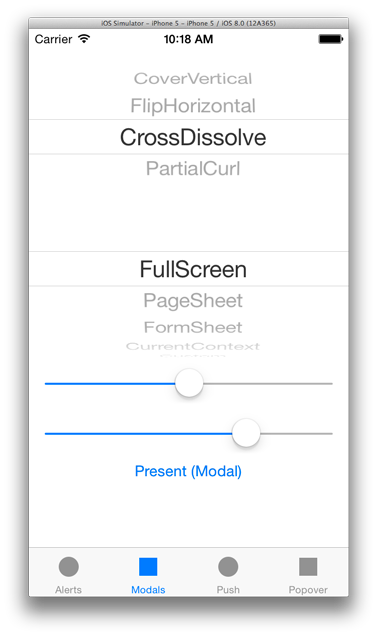
  3. Modals (presentViewController) – with options for playing with modalTransitionStyle(enum UIModalTransitionStyle) and modalPresentationStyle(enum UIModalPresentationStyle). modals2
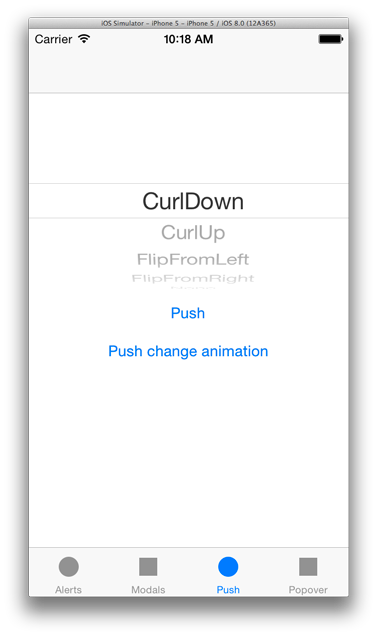
  4. Push (pushViewController) – with options for playing with animation transition(enum UIViewAnimationTransition) push2

You can find the github project here.

Tagged with: , , , , ,
Posted in Swift

How to create a concave SKPhysicsBody

I’m building a game using SpriteKit, and using the brilliant SKPhysicsBody Path Generator.

I came across a limitation of physics bodies, that their shapes need to be convex, or an error is generated(strangely, the simulator doesn’t seem to mind, but the device does!)

How to create a concave SKPhysicsBody? Create two SKPhysicsBody variables, using convex paths. You can now generate another SKPhysicsBody variable by performing a union on the two physics bodies, using the SKPhysicsBody initializer (bodyWithBodies). The two paths are convex, but the resulting body can be concave! You can achieve more complex shapes by performing a union of more than two physics bodies.

Tagged with:
Posted in Objective C, Swift